
iOS & iPadOS 13.6 Beta 2
- Jun 11, 2020
- 2 min read
Updated: Jun 18, 2020
Apple has seeded the second betas of iOS and iPadOS 13.6 to developers and public beta testers with compatible devices via the Apple Developer Centre or over-the-air once the developer profile has been installed. This update supersedes *OS 13.5.5, in which Apple has changed the version number and will now continued to be called *OS 13.6 Beta X.
Compatible models & how to download
iPhone ~ SE/2, 6s, 7/s, 8, X/s, Xr, 11 [355MB – 420MB download]
iPod Touch ~ 7th generation
iPad ~ Mini 4/5, Air 2/3, iPad 5/6/7, Pro (all models and sizes) [330MB download]
Over-the-air [requires Wi-Fi connection] (settings > general > software update)
macOS Catalina 10.15 (finder > device > check for update)
Windows & macOS Mojave 10.14 and lower (iTunes > device > check for update)
*OS 13.6 Beta 2 Changes
Automatic *OS Software Update Download & Install Toggles
Toggle "Automatically Download *OS Updates";
Toggle "Automatically Install *OS Updates";
Settings App > General > Software Update > Customise Automatic Update.
Current public releases of *OS automatically download and install software updates in the background if connected to a Wi-Fi network and the feature is enabled. In *OS 13.6, further control over software updates is provided, with the option to turn on or off automatic downloads and automatic installs. If enabled, the update will be downloaded over Wi-Fi when available and installed overnight whilst connected to power.
Note 'automatically download' is enabled by default so it will need to be disabled if you do not wish for the update to download. The customisation settings can be found via Settings App > General > Software Update > Customise Automatic Update.
Code in iPadOS 13.6 also suggests Apple is working on keyboard shortcuts that will allow users who have a Magic Keyboard or other attached keyboard to adjust the brightness level of the keys, but it's not clear if this will be a feature included in the update.

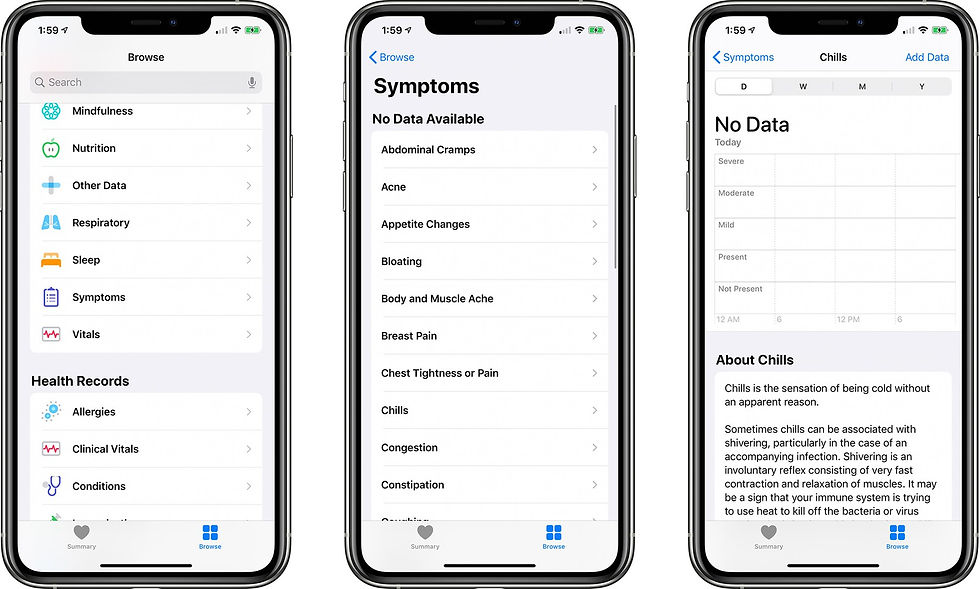
Health App – New 'Symptoms' Section
Add illness symptoms;
Explains what the symptom is;
Health App > Browse Tab > Symptoms.
Symptoms, such as abdominal cramps, acne, appetite changes, bloating, and body & muscle aches, can be found in the new "Symptoms" tab. Data can be added by pressing "Add Data" in the top right corner and categorised on a scale from not present, present, mild, moderate, and severe. At the bottom of the symptom card, information and a description can be found.
Apple News – Saved Reading Position
Register and saves reading position;
Current public releases of *OS and macOS does not save the reading position of a read article in Apple News. This means that when exiting the app and attempt to return to the same article later, the article opens from the beginning (top). *OS 13.6 will save the reading position, allowing users to continue the article where they left off.
This is the second update found to Apple News coming in *OS 13.6, after the discovery of Apple News+ Audio in Beta 1 (discussed below).
*OS 13.5.5/13.6 Beta 1 Changes
Apple News+ Audio (subscribers only)
Subscribers have access to several audio-recorded news stories instead of text;
Includes media centre to allow rewind, skip to next story, and playback speed adjustment.
As more features are discovered this post will be updated. Image credit: 9to5Mac.


Comments